Apparel decorating software ranges from beginner friendly design platforms to advanced industry systems that support screen printing, DTF, DTG, embroidery, and full print shop workflows. Beginners usually start with intuitive drag and drop design tools, while professionals depend on powerful vector, raster, and digitizing programs. As production demands grow, many shops also introduce workflow and business management software such as DecoNetwork to organize orders and manage production with greater accuracy.
Key Points:
- Beginners use Canva or Kittl. Pros use Illustrator, Photoshop, or digitizing tools.
- Software by method: vectors for screen print, raster for DTF and DTG, digitizing for embroidery.
- DecoNetwork is the go-to platform for quotes, production, and online stores.

Understanding The Different Categories Of Apparel Decorating Software
The apparel decorating industry uses a wide range of software tools, each designed for a specific part of the process. While many beginners think design is the entire workflow, production shops know that software extends far beyond graphics. Most decorators interact with three main categories.
- Graphic design tools, including vector and raster editors
- Embroidery digitizing programs that convert artwork into stitches
- Business management systems that handle orders, catalogs, and production
Think of these categories as the components of a kitchen. Your design software is the ingredients, your digitizing and production tools are the cookware, and your management system is the kitchen that keeps every part of the meal organized. If one part is missing, the final result suffers. The stronger your software stack becomes, the more consistent and professional your output will be.
Graphic design tools help you create the actual artwork. Digitizing software prepares embroidery machines to read and stitch the design. Workflow software keeps every department aligned from sales to shipping. Together these tools create a complete ecosystem for apparel decoration.
Best Beginner Friendly Apparel Decorating Software
Beginners often choose software that is enjoyable to use and requires little or no training. Simple interface design, large template libraries, and AI assisted features make beginner tools ideal for learning how apparel graphics are built.
Canva
Canva is extremely popular among new decorators due to its clean layout and intuitive editing tools. Users can access thousands of fonts, icons, shapes, and ready made templates. For simple T shirt designs, social media mockups, and fast visual experimentation, Canva provides a low friction way to learn design fundamentals.
Kittl
Kittl is a favorite among beginners who want more apparel focused results. Its templates, lettering tools, and vintage design effects create styles commonly requested in the T shirt and streetwear markets. For new designers who want professional looking graphics without mastering advanced software, Kittl is a strong starting point.
Inkscape
For decorators ready to explore vector design, Inkscape offers a no cost alternative to Illustrator. It supports scalable art, paths, strokes, and shape controls. While it has a learning curve, it helps beginners transition from simple drag and drop tools to true vector editing. For screen printers who need clean separations, Inkscape provides the structure required to grow.

Professional Apparel Decorating Software For Vector And Raster Artwork
As decorators move into more advanced production, beginner tools quickly reach their limitations. Professional apparel decorating software gives designers precise control over artwork, color, and print specifications. The choice of software depends heavily on the decoration method.
Why Screen Printing Requires Vector Artwork
Screen printing relies on crisp edges, exact line control, and scalable artwork. This is why vector based programs dominate the screen printing industry. Vector graphics allow each color to be separated cleanly and prepared for film or direct to screen output.
Adobe Illustrator is the industry standard for screen printing. It supports clean paths, spot color control, Pantone libraries, and advanced separation tools. Shops that produce multicolor prints depend on Illustrator for precise scaling and professional output. CorelDRAW is also widely used in apparel decoration, especially among shops that prefer its layout tools and workflow shortcuts.
Screen printing design is similar to blueprint drafting. Every line must be intentional and accurately placed. Vector tools provide that level of precision.
Why DTF And DTG Require Raster Artwork
DTG and DTF printing excel at producing photorealistic details, smooth gradients, and full color images. These methods require raster artwork, which captures millions of pixels and subtle tones.
Adobe Photoshop is the primary tool for DTF and DTG preparation. It allows decorators to adjust resolution, lighting, shadows, backgrounds, and color profiles. When printing portraits or detailed illustrations, Photoshop ensures the artwork maintains clarity and depth on fabric.
DTF and DTG designs are more like digital photography. It depends on pixel quality and fine image correction, making raster tools essential for professional results.
Choosing The Right Tool For The Right Print Method
Many shops use both vector and raster programs because production rarely fits into one category. A single design might need vector outlines, raster textures, and detailed color correction. Adobe Creative Cloud allows designers to move between Illustrator and Photoshop in a unified workflow, which simplifies collaboration and ensures artwork is print ready.

Specialized Embroidery Digitizing Software For Professionals
Embroidery is unique in the apparel decoration world. Instead of ink or toner, machines use stitches to form shapes, textures, and patterns. Because of this, embroidery requires specialized software that converts artwork into stitch paths the machine can understand.
Wilcom EmbroideryStudio
Wilcom EmbroideryStudio is widely considered the gold standard for commercial embroidery. It supports advanced stitch types, underlay settings, density control, and auto digitizing features. It also integrates with CorelDRAW, providing a combined environment for vector art and stitch design. While it is a premium investment, many U.S. embroiderers rely on it for its consistency and industry reputation.
Brother PE Design 11
The Brother PE Design 11 program is a more affordable option while still offering powerful digitizing capabilities. It supports custom stitch creation, editing tools, previews, and a range of machine file formats. Small to mid sized embroidery shops often choose PE Design 11 as they scale up production.
Richpeace Welcome Embroidery CAD
Richpeace is known for its industrial grade approach. It offers deep customization for both stitch creation and pattern sequencing. Decorators who handle detailed logos or complex fills use it to maintain control over the final embroidered result.
Digitizing is similar to choreographing a dance. Each stitch must follow a planned sequence that guides the machine smoothly across the fabric. Good digitizing software gives decorators the ability to plan every movement, creating clean and durable embroidery.
Use Apparel Decorating Software For Business Management
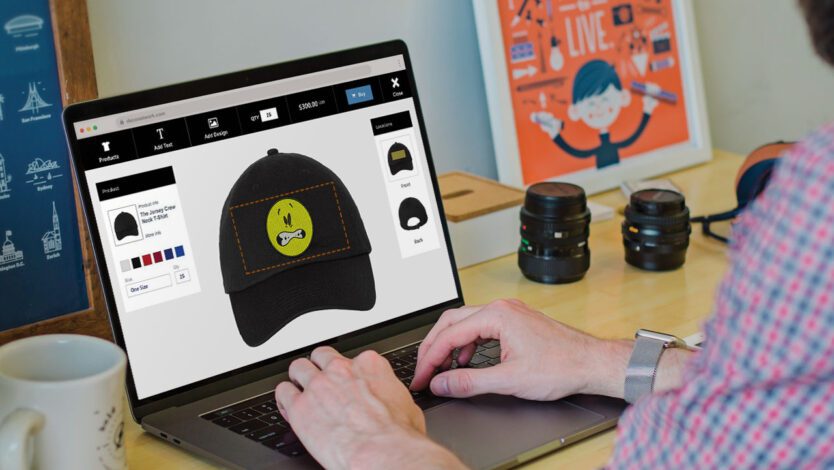
As shops grow, design software alone is no longer enough. Production teams need a way to manage orders, approve artwork, sync inventory, and track jobs from start to finish. This is where apparel decorating business management software becomes essential.
DecoNetwork is one of the most widely used platforms in the apparel decoration industry because it centralizes quoting, ordering, production management, online stores, and supplier catalogs in a single system. Instead of juggling spreadsheets, emails, and manual notes, shops gain a unified workflow that reduces delays and eliminates costly errors.
DecoNetwork is ideal for shops that:
- Produce apparel at moderate to high volume
- Offer multiple decoration methods
- Need organized production assignments and due dates
- Want integrated online stores for customers or teams
- Require accurate artwork approvals and version control
Using DecoNetwork is similar to upgrading from a basic toolbox to a complete workshop. The right tools are always in reach, everything is organized, and the work flows more efficiently from one step to the next. It becomes the operational engine that keeps the entire shop running smoothly.
When To Upgrade Your Apparel Decorating Software
Many decorators start with simple design platforms, but production demands eventually push them to adopt more advanced tools. Knowing when to upgrade your software can prevent workflow issues and ensure artwork is prepared correctly for print.
You may be ready for professional tools if:
- Your designs require clean vector shapes or complex print separations
- You are preparing artwork for commercial screen printing or DTG
- You need embroidery files that require precise digitizing
- You want faster turnaround times and clearer communication with clients
- You are expanding your shop into multiple decoration methods
Moving from Canva to Illustrator or from basic embroidery software to Wilcom is comparable to switching from a hobby level sewing machine to an industrial model. Both can stitch fabric, but the industrial machine operates at a speed and quality level that meets commercial demand.
Upgrading is not only about skill. It is about efficiency, accuracy, and the ability to scale your production as customer expectations increase.
Are Free Apparel Decorating Software Alternatives Effective?
Free software can be effective for hobbyists, startups, and low volume decorators who want to explore design without financial commitment.
Inkscape offers strong vector capabilities for screen printing layouts.
GIMP provides raster editing features similar to Photoshop.
Photopea is a browser based option that handles both vector and raster artwork without installation.
While these tools are powerful, they lack the full color management, print specific workflows, and advanced features found in industry standard programs. They work well for beginners but are not ideal for high volume or commercial production.

Final Recommendations: Building The Right Software Stack
Choosing the best apparel decorating software depends on skill level, production volume, and the services your print shop offers.
Beginner Print Shop Software For Apparel Decorators
These beginner tools help apparel decorators learn design basics, create simple artwork, and keep startup costs low while building confidence in screen printing, DTF, DTG, and embroidery workflows.
Growing Print Shop Software For Apparel Decorators
Growing print shops need stronger design tools for accurate artwork, faster prep, and smoother workflows. This mix supports vector, raster, and embroidery while improving production efficiency.
- Adobe Illustrator for precise vector artwork and clean print ready designs
- Adobe Photoshop for detailed raster artwork and high resolution image prep
- Brother PE Design for reliable embroidery creation and stitch file editing
- DecoNetwork for full shop management, quoting, production tracking, and online stores
Professional Print Shop Software For Apparel Decorators
Professional shops rely on full-scale design and management software for automation, precision, and consistent output. This stack supports high-volume apparel decoration and advanced production control.
- Adobe Creative Cloud Suite for advanced vector and raster production workflows
- Wilcom EmbroideryStudio for professional stitch files and high volume digitizing
- DecoNetwork for complete shop management, automation, and online store operations
Choose Apparel Decorating Software That Matches Your Goals
Choosing the best apparel decorating software depends on your skill level, the decoration method you use, and the scale of your business. Beginners can learn quickly using intuitive design tools, while professionals rely on precise vector and raster programs to achieve consistent results. As production grows, advanced digitizing software and business management platforms like DecoNetwork help shops streamline operations and reduce costly mistakes. When each part of your software stack works together, your shop can produce better artwork, meet deadlines with confidence, and grow sustainably.